> ## Documentation Index
> Fetch the complete documentation index at: https://docs.socializioz.com/llms.txt
> Use this file to discover all available pages before exploring further.
# Socializioz MCP
> Connect ChatGPT, Claude, and supported MCP clients to Socializioz using the current authenticated 12-tool surface.
Socializioz MCP lets supported AI clients work with an authenticated Socializioz workspace. Plan access, workspace membership, connected-account capabilities, post state, approvals, and publishing validation remain enforced by Socializioz.
## Plan availability
Socializioz MCP and External AI Access are available on **Pro** and **Enterprise** plans.
## Use Socializioz in ChatGPT
Socializioz is publicly available through ChatGPT Apps.
1. Open **Settings** in ChatGPT.
2. Open **Apps** or the app directory available to your account.
3. Find **Socializioz** and connect it.
4. Complete Socializioz authorization.
5. Select Socializioz from the tools menu or mention `@Socializioz` where supported.
Connect the public Socializioz ChatGPT App.
 Availability can depend on the user's ChatGPT plan, workspace settings, and administrator controls.
## Manual remote MCP connection
For supported remote MCP clients, use the Socializioz product endpoint:
```text theme={null}
https://mcp.socializioz.com/mcp
```
Authentication is completed through the Socializioz authorization flow. Do not share access tokens or private workspace credentials manually.
## Connect from Claude
When remote connectors are available for your Claude account, use **Settings > Connectors** and add or authorize the Socializioz remote MCP connection.
Do not use an old local `claude_desktop_config.json` example as the setup method for the remote Socializioz service.
## Product MCP versus Docs MCP
| Service | Purpose |
| ---------------------------------- | ----------------------------------------- |
| `https://mcp.socializioz.com/mcp` | Authenticated Socializioz workspace tools |
| `https://docs.socializioz.com/mcp` | Documentation search and reading only |
The Docs MCP does not create drafts, schedule posts, or access a user's Socializioz workspace.
## Current tools
### Workspace and brand context
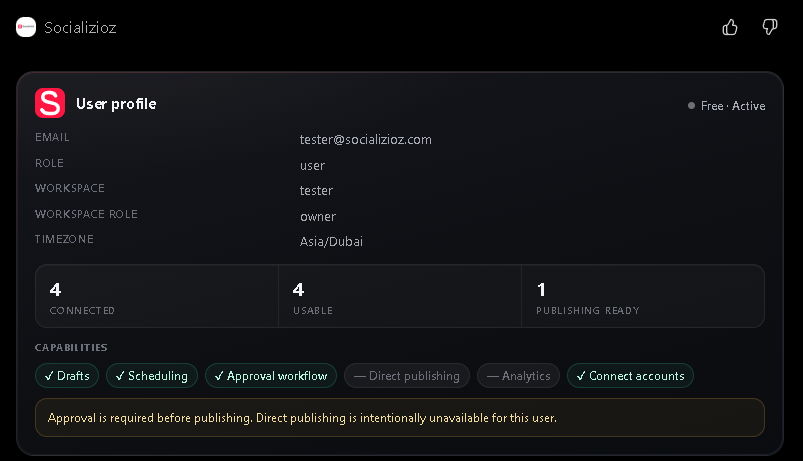
* `get_user_profile`
* `get_workspace_context`
* `get_brand_profile`
* `list_connected_accounts`
### Drafts and posts
* `create_draft_post`
* `list_posts`
* `get_post`
* `update_draft_post`
### Approval and scheduling
* `send_post_for_approval`
* `schedule_post`
* `reschedule_post`
* `cancel_scheduled_post`
## Safety and result verification
A client should claim an action succeeded only when the returned Socializioz result confirms it.
MCP actions remain subject to:
* Authenticated access.
* Workspace scope and membership.
* Plan availability.
* Connected-account ownership and capabilities.
* Post-state validation.
* Platform media and scheduling requirements.
* Approval and publishing controls.
The MCP service does not provide a tool for silently bypassing these rules.
## Typical workflow
1. Read the user and workspace context.
2. List connected accounts.
3. Retrieve the relevant brand profile when needed.
4. Create or update a draft.
5. Review the content, destination, media, and timing.
6. Send it for approval or schedule it through an allowed workflow.
7. Confirm the returned post state.
## Current limits
* The current tool surface focuses on workspace context, drafts, approvals, and scheduling.
* Image and Google Veo 3 video generation are available inside the Socializioz app, not through the current MCP tool list.
* Connecting an external client does not unlock unsupported plans or publishing platforms.
## Troubleshooting
| Problem | What to check |
| -------------------------------------- | --------------------------------------------------------------------------------------- |
| Socializioz does not appear in ChatGPT | Confirm app availability for the account or workspace and check administrator controls. |
| Authorization loops or expires | Sign in to Socializioz in the browser, then reconnect the app or MCP client. |
| Tool returns unauthorized | Reconnect the integration and confirm the correct Socializioz account and workspace. |
| Action was not completed | Read the returned error and verify the post state in Socializioz. |
| Connected accounts are missing | Confirm the active workspace and account connections inside Socializioz. |
## Related
* [Plans and billing](/account/plans-and-billing)
* [Integrations](/features/integrations)
* [Connections](/features/connections)
* [Approvals](/features/approvals)
* [Scheduling and calendar](/features/scheduling)
Availability can depend on the user's ChatGPT plan, workspace settings, and administrator controls.
## Manual remote MCP connection
For supported remote MCP clients, use the Socializioz product endpoint:
```text theme={null}
https://mcp.socializioz.com/mcp
```
Authentication is completed through the Socializioz authorization flow. Do not share access tokens or private workspace credentials manually.
## Connect from Claude
When remote connectors are available for your Claude account, use **Settings > Connectors** and add or authorize the Socializioz remote MCP connection.
Do not use an old local `claude_desktop_config.json` example as the setup method for the remote Socializioz service.
## Product MCP versus Docs MCP
| Service | Purpose |
| ---------------------------------- | ----------------------------------------- |
| `https://mcp.socializioz.com/mcp` | Authenticated Socializioz workspace tools |
| `https://docs.socializioz.com/mcp` | Documentation search and reading only |
The Docs MCP does not create drafts, schedule posts, or access a user's Socializioz workspace.
## Current tools
### Workspace and brand context
* `get_user_profile`
* `get_workspace_context`
* `get_brand_profile`
* `list_connected_accounts`
### Drafts and posts
* `create_draft_post`
* `list_posts`
* `get_post`
* `update_draft_post`
### Approval and scheduling
* `send_post_for_approval`
* `schedule_post`
* `reschedule_post`
* `cancel_scheduled_post`
## Safety and result verification
A client should claim an action succeeded only when the returned Socializioz result confirms it.
MCP actions remain subject to:
* Authenticated access.
* Workspace scope and membership.
* Plan availability.
* Connected-account ownership and capabilities.
* Post-state validation.
* Platform media and scheduling requirements.
* Approval and publishing controls.
The MCP service does not provide a tool for silently bypassing these rules.
## Typical workflow
1. Read the user and workspace context.
2. List connected accounts.
3. Retrieve the relevant brand profile when needed.
4. Create or update a draft.
5. Review the content, destination, media, and timing.
6. Send it for approval or schedule it through an allowed workflow.
7. Confirm the returned post state.
## Current limits
* The current tool surface focuses on workspace context, drafts, approvals, and scheduling.
* Image and Google Veo 3 video generation are available inside the Socializioz app, not through the current MCP tool list.
* Connecting an external client does not unlock unsupported plans or publishing platforms.
## Troubleshooting
| Problem | What to check |
| -------------------------------------- | --------------------------------------------------------------------------------------- |
| Socializioz does not appear in ChatGPT | Confirm app availability for the account or workspace and check administrator controls. |
| Authorization loops or expires | Sign in to Socializioz in the browser, then reconnect the app or MCP client. |
| Tool returns unauthorized | Reconnect the integration and confirm the correct Socializioz account and workspace. |
| Action was not completed | Read the returned error and verify the post state in Socializioz. |
| Connected accounts are missing | Confirm the active workspace and account connections inside Socializioz. |
## Related
* [Plans and billing](/account/plans-and-billing)
* [Integrations](/features/integrations)
* [Connections](/features/connections)
* [Approvals](/features/approvals)
* [Scheduling and calendar](/features/scheduling)