> ## Documentation Index
> Fetch the complete documentation index at: https://docs.socializioz.com/llms.txt
> Use this file to discover all available pages before exploring further.
# Connected apps & data
> Connect supported files, productivity, analytics, advertising, CRM, sales, marketing, community, and data services to Socializioz with explicit execution and approval boundaries.
Apps & Data extends Socializioz beyond social publishing channels. These integrations can provide supported file, document, calendar, spreadsheet, email, or team-workflow capabilities without turning the external service into a social publishing destination.
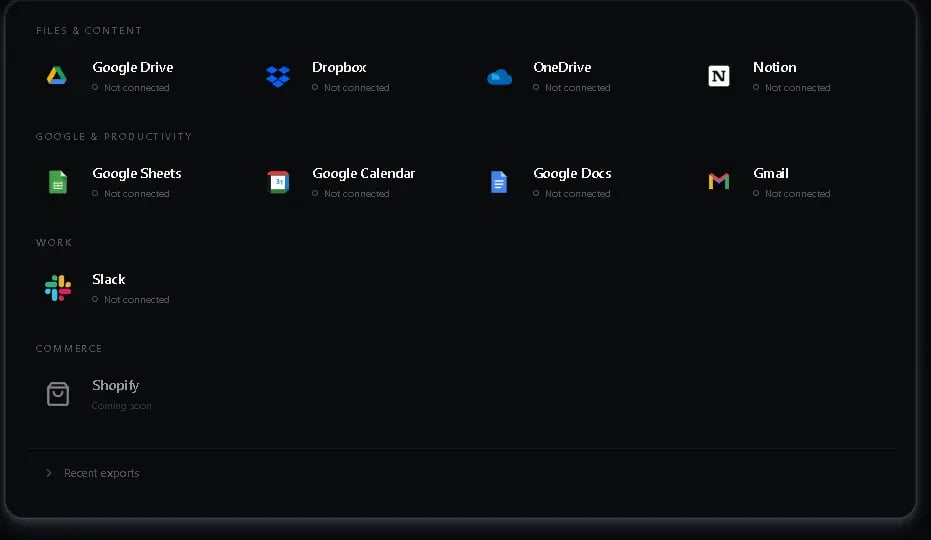 ## Current connected-app groups
The exact actions available for each service depend on authorization scopes, connection health, provider capabilities, Socializioz policy, and the exact account selected for the request.
| Area | Current examples | Typical Socializioz role |
| ---------------------------------- | ------------------------------------------------------------------- | ------------------------------------------------------------------------------------------------ |
| **Files and content** | Google Drive, Google Docs, Dropbox, OneDrive, Notion | Search, read, import, or work with supported provider content |
| **Communication and work** | Gmail, Slack, Microsoft Teams, Google Tasks, Airtable | Use supported account, message, task, collaboration, or data actions |
| **Analytics and advertising data** | Google Analytics, Google Ads, TikTok Ads, Pinterest Ads, Reddit Ads | Read supported reporting/account data and use approved actions where available |
| **CRM and sales** | HubSpot, Salesforce, Apollo | Use supported connected CRM or prospecting capabilities |
| **Marketing operations** | Omnisend | Use supported connected marketing-operations capabilities |
| **Community and video data** | Reddit, YouTube | Read supported community/channel data while keeping social publishing on its dedicated lifecycle |
| **Product-specific Google flows** | Google Calendar, Google Sheets | Mirror supported scheduled-post state or export supported Socializioz data |
A listed service does not mean every possible provider action is enabled. Socializioz discovers the actions available for the exact authorized account and then applies its execution policy before anything runs.
## Connect a service
Open **Connections** and switch to **Apps & Data** when that section is available for your workspace.
Select the integration you want to connect.
Complete the provider authorization flow and review the permissions being requested.
Confirm that the account identity and connection state appear correctly.
Open the integration management surface to see the capabilities currently enabled for that connection.
## Connection scope
Not every Apps & Data connection uses the same ownership model as a social publishing account.
Some productivity integrations are connected to the signed-in user rather than becoming a workspace social destination. Socializioz still checks the authorized user and relevant workspace context before a product workflow uses the connection.
Do not assume that connecting a productivity account automatically gives every workspace member access to all of that provider's data.
## Manage a connection
The integration management surface can show the provider account identity, connection health, available scopes or capabilities, refresh/reconnect actions, and disconnect controls where supported.
A connection that needs reauthorization should be repaired before you rely on it for a workflow.
## Google Sheets exports
Google Sheets supports the export actions explicitly offered by Socializioz, such as supported campaign or brand-data exports.
An export is a deliberate Socializioz action. The connection is not documented as unrestricted spreadsheet access.
Where supported, recent export history can help you verify that an export was created and open the resulting destination.
## Google Calendar
Google Calendar is a user-enabled mirror for supported Socializioz scheduling activity, not a publishing authorityis a user-enabled mirror for supported Socializioz scheduling activity, not a publishing authority.
When scheduled-post sync is enabled, Socializioz can create or reuse its dedicated secondary **Socializioz** calendar and mirror the authenticated user's canonical future scheduled posts into it. Supported reschedules update the mapped event, and cancellation removes only the mapped Socializioz eventWhen scheduled-post sync is enabled, Socializioz can create or reuse its dedicated secondary **Socializioz** calendar and mirror the authenticated user's canonical future scheduled posts into it. Supported reschedules update the mapped event, and cancellation removes only the mapped Socializioz event.
The calendar connection does not browse or rewrite arbitrary personal calendar events, and it cannot bypass Socializioz validation, approvals, account capability, or provider publishing state.
The calendar connection does not browse or rewrite arbitrary personal calendar events, and it cannot bypass Socializioz validation, approvals, account capability, or provider publishing state.
## Files and documents
For file or document services, use the actions exposed for the selected integration. A connection can support different combinations of browsing, searching, importing, uploading, or document operations depending on the provider and rollout.
Imported media must still satisfy Socializioz workspace ownership, media processing, and destination validation before it can be published.
## Agent execution and approval
The in-app Socializioz Agent can discover the capabilities exposed for an authorized managed connection at request time.
The execution boundary is deliberate:
* Supported **reads/searches/reports** can run directly.
* Supported **writes** return a confirmation handoff and run only after the user chooses **Approve & run**.
* The Agent cannot mint its own write approval.
* **Destructive generic actions** are blocked.
* **Social publishing** continues through the normal Socializioz Post lifecycle instead of a generic connected-app write.
Provider credentials stay behind the Socializioz integration boundary and are not returned to the browser or handed to the Agent as ordinary data.
The native remote Socializioz MCP is a separate surface. A service connected inside Socializioz does not automatically become a generic provider tool in the remote MCP; external MCP clients should use only the tools returned by live MCP discovery.
## Troubleshooting
| Problem | What to check |
| -------------------------------------------------- | -------------------------------------------------------------------------------------------------------------------------------------------------------------------- |
| A connected app is not visible | Confirm the current Connectors catalog, signed-in user, workspace context, and whether that service is enabled for the current account. |
| Authorization completed but the account is missing | Refresh Connections and confirm the provider flow returned to the correct signed-in Socializioz account. |
| Integration needs reconnecting | Reauthorize the provider account, then verify the connection health before retrying the workflow. |
| An expected action is missing | The action may not be enabled for the current integration, account, or rollout. Use the capabilities shown by Socializioz rather than assuming provider-wide access. |
| Google export fails | Confirm the Google connection is healthy, then retry the export from the original Socializioz workflow. |
| Imported media cannot publish | Verify media readiness and destination requirements in the Media Library or Composer. |
## Related
* [Integrations](/features/integrations)
* [Connections](/features/connections)
* [Media Library](/features/media-library)
* [Socializioz MCP](/socializioz-mcp)
* [Security](/account/security)
* [Troubleshooting](/features/troubleshooting)
## Current connected-app groups
The exact actions available for each service depend on authorization scopes, connection health, provider capabilities, Socializioz policy, and the exact account selected for the request.
| Area | Current examples | Typical Socializioz role |
| ---------------------------------- | ------------------------------------------------------------------- | ------------------------------------------------------------------------------------------------ |
| **Files and content** | Google Drive, Google Docs, Dropbox, OneDrive, Notion | Search, read, import, or work with supported provider content |
| **Communication and work** | Gmail, Slack, Microsoft Teams, Google Tasks, Airtable | Use supported account, message, task, collaboration, or data actions |
| **Analytics and advertising data** | Google Analytics, Google Ads, TikTok Ads, Pinterest Ads, Reddit Ads | Read supported reporting/account data and use approved actions where available |
| **CRM and sales** | HubSpot, Salesforce, Apollo | Use supported connected CRM or prospecting capabilities |
| **Marketing operations** | Omnisend | Use supported connected marketing-operations capabilities |
| **Community and video data** | Reddit, YouTube | Read supported community/channel data while keeping social publishing on its dedicated lifecycle |
| **Product-specific Google flows** | Google Calendar, Google Sheets | Mirror supported scheduled-post state or export supported Socializioz data |
A listed service does not mean every possible provider action is enabled. Socializioz discovers the actions available for the exact authorized account and then applies its execution policy before anything runs.
## Connect a service
Open **Connections** and switch to **Apps & Data** when that section is available for your workspace.
Select the integration you want to connect.
Complete the provider authorization flow and review the permissions being requested.
Confirm that the account identity and connection state appear correctly.
Open the integration management surface to see the capabilities currently enabled for that connection.
## Connection scope
Not every Apps & Data connection uses the same ownership model as a social publishing account.
Some productivity integrations are connected to the signed-in user rather than becoming a workspace social destination. Socializioz still checks the authorized user and relevant workspace context before a product workflow uses the connection.
Do not assume that connecting a productivity account automatically gives every workspace member access to all of that provider's data.
## Manage a connection
The integration management surface can show the provider account identity, connection health, available scopes or capabilities, refresh/reconnect actions, and disconnect controls where supported.
A connection that needs reauthorization should be repaired before you rely on it for a workflow.
## Google Sheets exports
Google Sheets supports the export actions explicitly offered by Socializioz, such as supported campaign or brand-data exports.
An export is a deliberate Socializioz action. The connection is not documented as unrestricted spreadsheet access.
Where supported, recent export history can help you verify that an export was created and open the resulting destination.
## Google Calendar
Google Calendar is a user-enabled mirror for supported Socializioz scheduling activity, not a publishing authorityis a user-enabled mirror for supported Socializioz scheduling activity, not a publishing authority.
When scheduled-post sync is enabled, Socializioz can create or reuse its dedicated secondary **Socializioz** calendar and mirror the authenticated user's canonical future scheduled posts into it. Supported reschedules update the mapped event, and cancellation removes only the mapped Socializioz eventWhen scheduled-post sync is enabled, Socializioz can create or reuse its dedicated secondary **Socializioz** calendar and mirror the authenticated user's canonical future scheduled posts into it. Supported reschedules update the mapped event, and cancellation removes only the mapped Socializioz event.
The calendar connection does not browse or rewrite arbitrary personal calendar events, and it cannot bypass Socializioz validation, approvals, account capability, or provider publishing state.
The calendar connection does not browse or rewrite arbitrary personal calendar events, and it cannot bypass Socializioz validation, approvals, account capability, or provider publishing state.
## Files and documents
For file or document services, use the actions exposed for the selected integration. A connection can support different combinations of browsing, searching, importing, uploading, or document operations depending on the provider and rollout.
Imported media must still satisfy Socializioz workspace ownership, media processing, and destination validation before it can be published.
## Agent execution and approval
The in-app Socializioz Agent can discover the capabilities exposed for an authorized managed connection at request time.
The execution boundary is deliberate:
* Supported **reads/searches/reports** can run directly.
* Supported **writes** return a confirmation handoff and run only after the user chooses **Approve & run**.
* The Agent cannot mint its own write approval.
* **Destructive generic actions** are blocked.
* **Social publishing** continues through the normal Socializioz Post lifecycle instead of a generic connected-app write.
Provider credentials stay behind the Socializioz integration boundary and are not returned to the browser or handed to the Agent as ordinary data.
The native remote Socializioz MCP is a separate surface. A service connected inside Socializioz does not automatically become a generic provider tool in the remote MCP; external MCP clients should use only the tools returned by live MCP discovery.
## Troubleshooting
| Problem | What to check |
| -------------------------------------------------- | -------------------------------------------------------------------------------------------------------------------------------------------------------------------- |
| A connected app is not visible | Confirm the current Connectors catalog, signed-in user, workspace context, and whether that service is enabled for the current account. |
| Authorization completed but the account is missing | Refresh Connections and confirm the provider flow returned to the correct signed-in Socializioz account. |
| Integration needs reconnecting | Reauthorize the provider account, then verify the connection health before retrying the workflow. |
| An expected action is missing | The action may not be enabled for the current integration, account, or rollout. Use the capabilities shown by Socializioz rather than assuming provider-wide access. |
| Google export fails | Confirm the Google connection is healthy, then retry the export from the original Socializioz workflow. |
| Imported media cannot publish | Verify media readiness and destination requirements in the Media Library or Composer. |
## Related
* [Integrations](/features/integrations)
* [Connections](/features/connections)
* [Media Library](/features/media-library)
* [Socializioz MCP](/socializioz-mcp)
* [Security](/account/security)
* [Troubleshooting](/features/troubleshooting)